
Timeline
All papers must be marked up by 9 March
Please keep to this deadline, as this impacts every process that follows:
28 January to 9 March – papers are marked up by convenors
April – call for funding
April to 1 June – early bird registration*
*all active participants must register by the end of early bird to confirm their spot on the programme.
The call for papers closed on 26 January 2026 with the conference receiving a total of 3319 papers, 100 films and 64 labs. As we are limited by the space available in July, convenors will have to make some very difficult decisions regarding which papers they accept.
How many papers you can accept
The paper/session allocation has been carefully calculated to ensure the conference will fit within the space constraints we face. While we are aware of how difficult this makes things for you, it sadly cannot be helped. We are unable to consider any exceptions, as each panel has already been considered individually.
Roundtables:
All roundtables can have one 105-minute session. Due to the space limitations posed by this year’s call, Roundtable convenors may not accept more than five ‘provocations’.
Lightning Panels:
Lightning panels can include a maximum of ten participants per 105 minute session, up to two sessions = a maximum of 20 accepted papers.
Panels:
As we have come to expect this year’s conference has been highly oversubscribed. As always, there is a physical limit to the number of face-to-face delegates we can have, and convenors will be asked to accept a specified number of the proposals they have received (rather than a number based on the number of 105-minute panel sessions they are allocated).
For the sake of equity across the accepted panels, the Executive Committee have set the acceptance rate at 55%, and the organising team will be implementing and communicating the resultant number to each panel’s convenors shortly. This means that many panels will have a second session which is not full (5 papers), this is intentional, as the result of implementing a 55% acceptance rate, rather than basing limits on the number sessions allowed.
What does this mean in practice?
Convenors of each panel will be notified about the maximum number they may accept (see the next points). If convenors wish to accept fewer for whatever reason (to have a tighter panel, or to have more space for discussion, etc.) this is possible; but it will not be possible to accept more, so please do not request it!
While this will mean that some convenors will be holding panels which appear to have time available for further papers, they may not accept more than the number specified. There is an upside in that the additional time can be used for longer discussion, slightly longer papers, or finishing the panel a little earlier.
The Executive recognise that there will be many convenors unhappy at having to turn away so many excellent proposals but this approach is felt to be the fairest way to share the limited conference resource between EASA’s many members.
Please note: panels with three or four sessions must be willing to be scheduled (at least partly) on the Friday, 24 July. Friday is the last day of the conference and the only one with three session slots – all preceding days have two sessions each.
NB. For the five panels which received the most proposals, the percentage needs to be lower than 55% in order for these panels not to be overly long, disrupting timetabling and mobility within the programme; that aside there will be no exceptions.
How will I know what my panel’s maximum number of papers is?
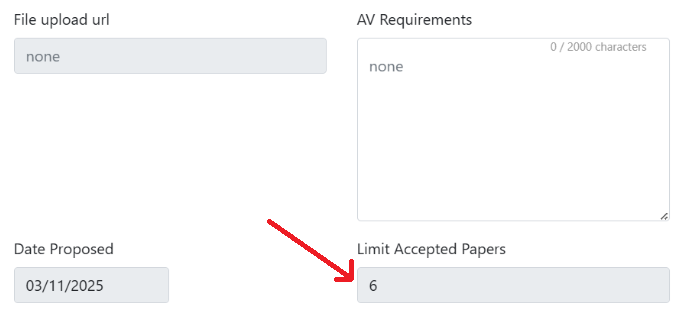
Each panel’s paper limit can be found on the panel management page, on the right hand side near the AV requirements and timing requests boxes. The software will not allow the convenors to accept anything above this limit.
NB. No panel session should include more than five papers, but can include fewer – this is a convenor decision. For example, a panel with seven accepted can be split over two sessions as 5+2 or as 3+4, etc. (the sessions remain 105 minutes in length when they contain fewer than 5 papers, allowing greater flexibility in presentation and discussion timing).
Can I add a discussant to my panel?
Due to the paper limit the call resulted in, convenors must email the administrators at conference(at)easaonline.org in order to request adding a discussant. At this point, each case will be reviewed individually. Please note that:
- Discussants should not come from the list of rejected papers.
- Discussants who are otherwise already participating at the conference are more likely to be approved as they are not adding to the number in attendance.
- In many cases, adding a discussant may count as one additional participant in the panel, meaning that the number of papers allowed will be reduced by one.
And what about paper transfers?
To keep the acceptance rate as high as 55%, this year there will be no transfer process, as there will be no further spaces into which papers can be moved: papers must be accepted or rejected.
Multiples
Many authors proposed multiple papers to the conference – in fact, a third of paper proposals in oversubscribed panels were submitted by authors who have also submitted papers elsewhere (in some cases this was an identical paper submitted to different panels). If the same paper was accidentally submitted to the same panel, we have removed it.
Once all papers have been marked up (9 March), we will anyway ask all authors of multiple accepted papers to retain just one (informing us within a week); but it may be simpler and less frustrating for you, if you approach authors with this question first.
As you email authors letting them know your decision, please ask accepted authors to confirm their place in your panel and withdraw all other papers. Do this before emailing rejected authors, and you may have the opportunity to fill spots quickly. Given the number of submissions this year, you should have no problem filling panels.
Marking up papers on the system
How to start
You can view and mark up individual paper proposals by going to the conference management page and clicking the pencil icon on the left of the panel reference, under “Edit”. N.B. the papers listed on this page under the list of panels are your (co)authored papers, not the panel’s proposed papers.

PDF, if you like
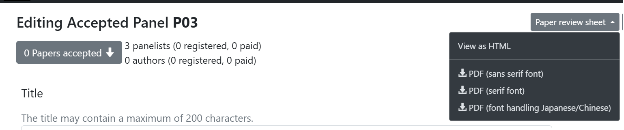
If you find PDFs a comfortable format for reading/note-taking, you can click the ‘Paper Review Sheet’ button at the top of the page, to download a PDF of all the proposals.
Please, be fair
The call for papers was public, so you may have received proposals from people you do not know: please treat all proposals as equally as you can, and do not only accept the proposals you have solicited directly.
Organising the marked papers
At the bottom of the page you will see four coloured boxes with options for the proposals.

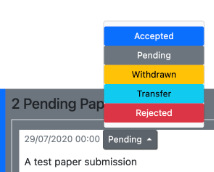
All the proposals start in the grey ‘Pending Papers’ box, from where you can drag and drop papers to the different boxes depending on your decision, then click on ‘Save’ to finalise the decision. You can also click on ‘Reset/Refresh’ if you want to start over.
If drag and drop is tricky, there is also a status switch which you can use, please see here.
Please drag the proposals into the order in which you initially wish them to be presented.
Accepted – obviously – is for the proposals you wish to accept into your panel. Use that only for the proposals that you wish to retain in your panel.
Rejected is for proposals you feel do not have a high enough scholarly quality to retain a place in the conference.
Withdrawn is for when authors inform you or us that they are no longer able to proceed with that proposal or attend the conference. They do not always email us with this news so if you receive such information later in the process, please remember to move their proposals to ‘Withdrawn’, so that we know, too.
Please mark up all proposals by 9 March, do not leave any as ‘pending’. After moving all proposals, click on the ‘Save’ button beneath the list. All accepted proposals will immediately show on your public panel page on the conference website, beneath the panel abstract.
Emailing authors
When you mark up a proposal, the decision will show in the author’s account. However the system does not send an email to the author alerting them of the status change, so please do your colleagues the courtesy of sending them an email informing them of your decision.
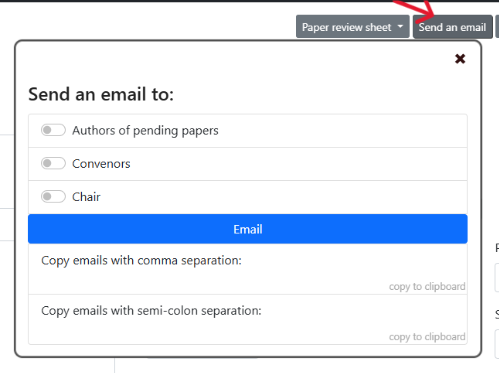
To make this easier click the ‘Send an email’ button at the top of the panel edit page and choose which subsets of authors you wish to write to, and which method you wish to use to generate an email.
It is the convenors’ responsibility to reach out to and confirm the attendance of accepted paper authors. You should email authors as soon as decisions are made and ask any confirmed authors with multiple submissions to withdraw from other panels. Some authors may need to wait till funding is secured before confirming attendance, but emailing promptly will enable you to have a clearer idea of who is attending. Informing authors in a timely manner also enables those unable to secure institutional funding to apply to the call for funding or consider online attendance (which is cheaper and equally effective in the fully hybrid conference).
Throughout, convenors must ensure that all session participants are well briefed and that panels meet EASA2026 requirements. To that end, convenors should not only communicate their decisions about proposals to their session, but also later in the process email the participants to: inform them of the speaking order (this will also be displayed on the website panel page), inform them as to how much time they have been allocated, remind them to register to attend the conference (the registration status of participants can be seen in the login environment), inform them of any late changes or additional chairs/discussants, and any other information related to the session. If participants withdraw, convenors should mark these withdrawals in the system.