


If you are presenting at EASA2026, this website is here to help you prepare.
Timeline
The convenors have time until 9 March to mark up (accept or reject) their papers.
28 January to 9 March – papers are marked up by convenors
March to April – call for funding
30 March to 1 June – early bird registration*
*all active participants must register by the end of early bird to confirm their spot on the programme.
How to look up the fate of my paper
We have asked convenors to email authors about their decisions after the call for papers deadline (February 2026), but sometimes emails fail (or humans do), so you can check your paper acceptance status by logging into the system from the conference website (see the Log in link with the human head icon in the top right of your screen). Once logged in, click on the Logged in drop-down menu, select Conferences, select the conference from the drop down menu called ‘current’, and find the conference paper to check its status. If it says ‘pending’, the decision is yet to be made.
Authors can use this same Log in space to edit their proposals as well as their personal details (add new institution, correct a spelling error etc.) – see next item.
Acceptance & Visa support letters
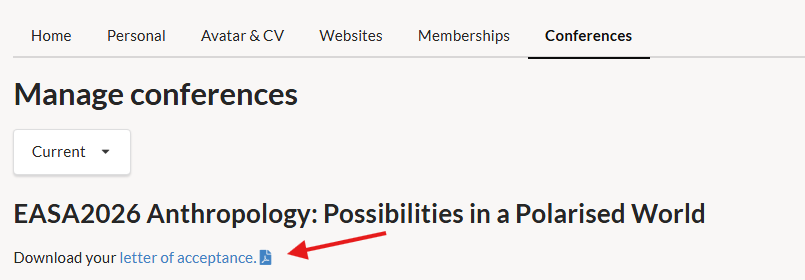
Acceptance letters are available on each person’s account who has accepted content in the conference, be it a paper or a panel. They are designed to help with institutional funding applications, time off work, and proof of acceptance for other related reasons.
Visa support letters are a different type of letter: in order for them to be robust enough for the visa application process, they need us to gather some more information from you in order to issue one. You can do this via the form on the visa page under travel info on the website. n.b. the visa letter has not been finalised yet, this will be available on the website before the start of March.
Editing your paper
Paper authors can use the login link in the toolbar described above to edit their proposals. Click the edit icon to the left of the paper title to open the editing page. Make your changes on the editing page and click “save” at the bottom of the page to save these changes.
Adding co-authors
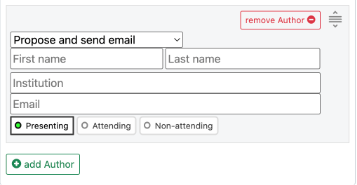
If you did not specify colleagues when proposing the paper/contribution, you can add them through the system. You can do this by clicking on the green ‘+ add author’ button at the bottom of the authors section. Type their name, institution and email into the boxes that appear, then click the green ‘save’ on the right hand side, or the bottom of the page, to confirm and save any changes/additions.
Participants will appear as ‘proposed’ and not be visible on the public programme until they create an account and accept their role via the email sent to them.
If you have difficulties with this, please email the conference administrators with the name, institution and email address of participants as well as the role you wish to add them to, and we will email them a request to add their details to your content.
Marking presenting/attending/non-attending
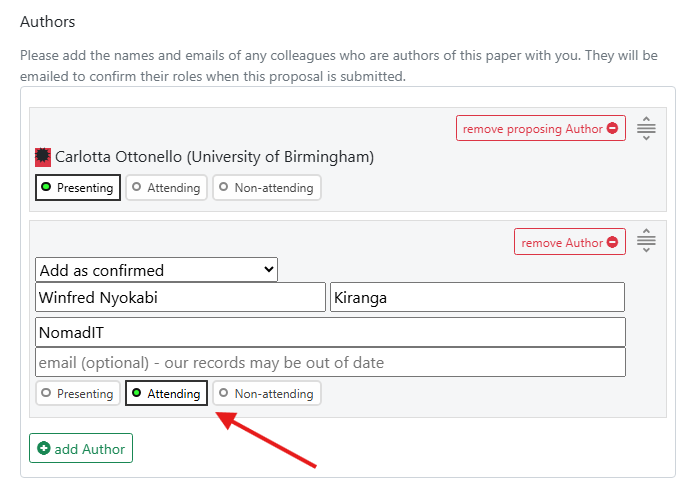
At any point in the conference run-up, you may want to tag, or change the tags, for authors. The tags are used to indicate who is presenting out of the authors in attendance (Presenting), who will be present but not presenting (Attending), and who will not be attending at all but contributed to the research and/or writing of the paper (Non-attending).*
You can do this by clicking on the different tags as below (the ones with the little circle which turns green/filled-in when you click it), and this will work also when the paper has been on the system for a while.
You may not mark yourself as either “attending” or “non-attending” if you are the only author on the paper. If you are unable to present your paper and need to withdraw, you should notify your convenors as well as the conference administrators via email.
*please note that those attending online count as attending, as they are required to register. Non-attending is for those unable to attend in any mode.
Adding more information about yourself
Select ‘Manage Account’ from the Logged in link in the top toolbar, to insert your TwitterID, ORCID, a short biography, links to your webpages (institutional, project, public big-tech networking sites, etc.), a photo/avatar and even upload a CV. This information allows those browsing the published conference content, to learn more about those involved.
Pre-circulation of papers
EASA has no rule about this, but many convenors are keen to pre-circulate completed papers. To facilitate this and save on email traffic, if requested by convenors, authors can upload PDFs of their papers within the online system, which will then show as downloadable files beneath the abstract on the panel page. Initially the system is set so these PDFs are only visible to other panelists; they can be made publicly visible, if panel convenors request it.
Timing of presentations
Each panel/workshop session slot will be 105 minutes long, accommodating a maximum of five presenters. Convenors should allot each presenter a maximum of 15+5 mins for panels of five papers. However if the panel is a Lightning panel, it may accept more than five presentations within a session (up to 10).
Communication between authors/convenors
Convenor/author email addresses are not displayed on the panel pages but emails can be sent via the secure form accessed via the panel pages. If you cannot work that, please email conference(at)easaonline.org to obtain relevant email addresses.